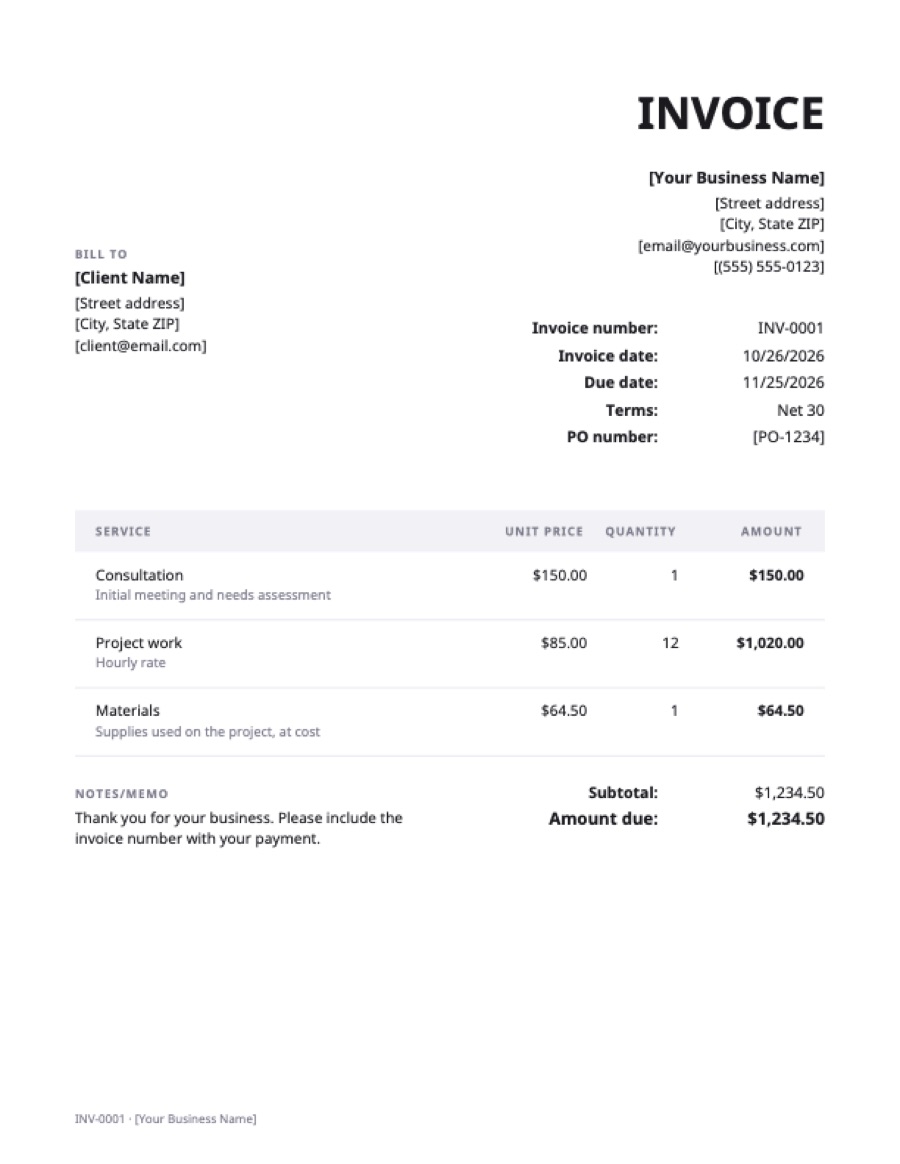
What’s on the word invoice template
Extra fields on this template: PO number.
| Service | Qty | Rate | Amount |
|---|---|---|---|
| ConsultationInitial meeting and needs assessment | 1 | $150.00 | $150.00 |
| Project workHourly rate | 12 | $85.00 | $1,020.00 |
| MaterialsSupplies used on the project, at cost | 1 | $64.50 | $64.50 |
| Total | $1,234.50 | ||
Example prices in US dollars. Replace them with your own; in the generator, any currency works.
How to use the Word invoice template
- Download and open it in Word (desktop, Mac or Word for the web).
- Replace everything in [brackets]: your business name and address, the client’s details, and the PO number if the client gave you one. Delete the PO line if not.
- Give it the next invoice number and today’s date. Never reuse a number.
- Edit the line items. Add rows with Tab in the last cell; delete rows you don’t need.
- Work out each amount (quantity × rate), then the subtotal, any tax and the total. Word doesn’t recalculate a table by itself, so check the arithmetic.
- Save a copy as PDF (File → Save As → PDF, or File → Export) and send the PDF, not the .docx.
Word, Excel or the online generator?
| Word | Excel | Online generator | |
|---|---|---|---|
| Adds up totals | No, by hand | Yes, with formulas | Yes |
| Easy to restyle | Yes | Harder | Logo and colour |
| Needs software | Word or a free alternative | Excel or Google Sheets | Only a browser |
| Output for the client | Save as PDF | Save as PDF | PDF download |
Word is the best choice if you want to restyle the layout freely. If you’d rather not do the arithmetic, use the Excel template or fill it in online.
Keeping Word invoices organised
Save each invoice as its own file named with the number and client, for example INV-0042 Acme.docx, and keep the PDF you sent beside it. Keep a simple list of numbers, dates, amounts and when each was paid; a spreadsheet works. That list is what you’ll need at tax time and when you chase a late payment.
Frequently asked questions
Does this template work with Google Docs?
Yes. Upload the .docx to Google Drive and open it with Google Docs, or see the Google Docs invoice template page for step-by-step instructions.
Can Word calculate the invoice totals?
Word tables can hold simple formulas (Layout → Formula), but they don’t update automatically when you change a number. For totals that recalculate, use the Excel template or the online generator.
Should I send the Word file to my client?
No. Save it as a PDF and send that. A PDF looks the same on every device and the client can’t change the amounts by accident.
Is there a Word invoice template with a logo?
Delete the business name at the top of the template and insert your logo there (Insert → Pictures). In the online generator you can upload a logo and it prints on every invoice.