Free invoice generator, download yours now.
Create, customize, and download professional invoices in minutes — no sign-up needed. Fill it in on the left and watch the PDF build itself on the right.
PDF is free. Saving uses Billsato Pro: free for 7 days, no card needed.
Your details
PNG, JPG or SVG. Printed at the top of the invoice.
Design
A light tint behind the line-item headings.
Invoice details
Payment will be due 08 Nov 2026.
PO number, project, reference: anything else the invoice should carry.
Items
Shown at the bottom of the invoice and the PDF.
Payment
How should your client pay you? Optional — without it the invoice simply carries your terms.
Summary
PDF is free. Saving uses Billsato Pro: free for 7 days, no card needed.
How to create an invoice online
Creating a professional invoice takes less than two minutes with Billsato's free invoice generator. Here is how it works.
Enter your business details. Add your business name, address, email, and phone number. This appears at the top of every invoice you create, so your clients always know who the invoice is from. Upload your company logo too: it prints at the top, and its main color becomes the invoice theme.
Add your client's information. Fill in your customer's name, email, phone, and address. Accurate client details make sure the invoice reaches the right person and looks professional. If you ship somewhere else, tick “Ship to a different address” and add the delivery address.
List the items or services. Describe each product or service, its quantity, and its unit price. Billsato calculates each line and the subtotal automatically. Tick “Add descriptions” if a line needs more explanation than its name gives.
Set your tax rate and discount. Enter the tax rate for your region, or leave it at zero if the transaction is tax exempt. Apply a percentage or fixed-amount discount to the invoice, and the total updates as you type.
Add notes or a memo. Include payment instructions, terms such as “Net 30” or “Due on receipt”, or a short thank-you. Whatever you write appears at the foot of the finished invoice.
Check the live preview. The finished PDF is drawn beside the form and redraws as you type, so what you see is exactly the document you are about to send — no guessing, no generate step.
Download the PDF. Click Download PDF to download your invoice as a print-ready PDF, sized for US Letter or A4. Email it to your client, file it for your records, or print it. To keep the invoice and reuse the client next time, try Billsato Pro, free for 7 days.
Everything this free invoice maker does
Billsato is a free invoice maker that handles the layout and the math for you, so you can create invoices that look professional in a couple of minutes.
Your logo and brand colors: Upload your company logo (PNG, JPG or SVG) and it prints at the top of every invoice. Its main color becomes the invoice theme, or choose another theme color.
37 currencies and 67 languages: Bill in US dollars, euros, pounds and 34 other currencies, with every amount formatted correctly. Switch the page to any of 67 languages and the invoice and its PDF are written in that language too.
Works on any device: Create invoices on your phone, tablet or computer. Billsato runs in the browser, so there is nothing to install and no app to download.
Automatic calculations: Line totals, tax, discounts, shipping and the amount due are worked out as you type, so the math on your invoice is always right.
Invoice numbers and due dates: Every invoice gets a unique invoice number you can change, and the due date follows from your payment terms: Net 15, Net 30 or any number of days.
How your client pays you: Add bank transfer details, a payment link with a QR code, check instructions, or payment apps such as Zelle, Venmo and PayPal. They print on the invoice, and your client pays you directly.
A clean PDF in Letter or A4: Download a print-ready PDF in US Letter or A4 size, with no watermark and no Billsato branding.
Free, with no strings attached: Make as many invoices as you need, with no sign-up and no usage limits. Your invoice is created in your browser.
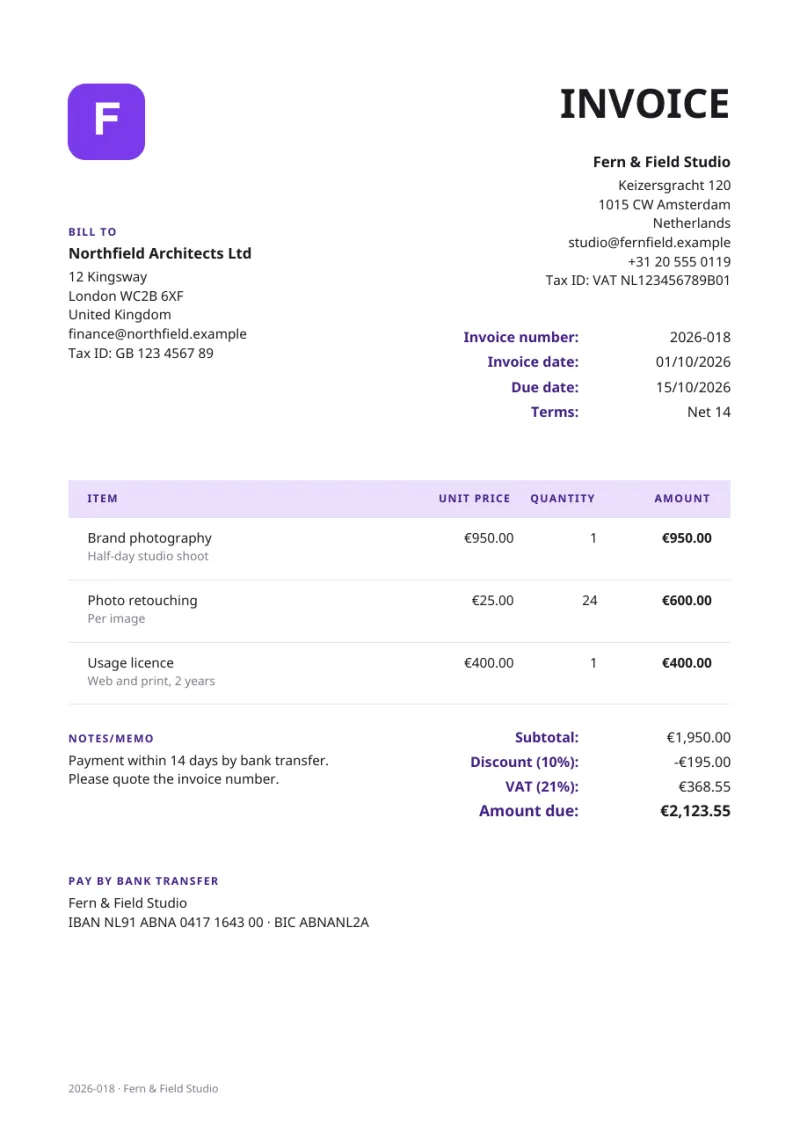
A free invoice template you fill in online
Looking for an invoice template? Billsato works like one, without the spreadsheet. Instead of downloading a Word or Excel invoice template and adding up the totals yourself, you fill in this online invoice template and download the finished invoice as a PDF.
The layout already has everything an invoice needs: your business details, the client's details, an invoice number, the invoice date and due date, line items, tax and payment instructions. Choose US Letter or A4, add your logo and pick a theme color; the live preview shows exactly what your client will receive.
Use it as a simple invoice template for freelance work, a service invoice for consulting, or a sales invoice for products. Label each line as an item, product or service, hide quantities for flat fees, or add extra fields such as a PO number.
What is an invoice?
An invoice is a formal document that a seller sends to a buyer to request payment for goods delivered or services rendered. It is a record of the transaction for both parties and an essential part of business accounting.
Invoices are not the same as receipts or bills. An invoice is sent before payment is made — it is a request. A receipt is issued after payment has been received. A bill is what the buyer sees; an invoice is what the seller sends. The same document, two perspectives.
Every business that sells products or services — freelancer, small business, or large enterprise — needs invoices to track revenue, manage cash flow, and keep accurate financial records for tax purposes. A clear, itemized invoice also makes your business look established and builds trust with clients.
What to include in an invoice
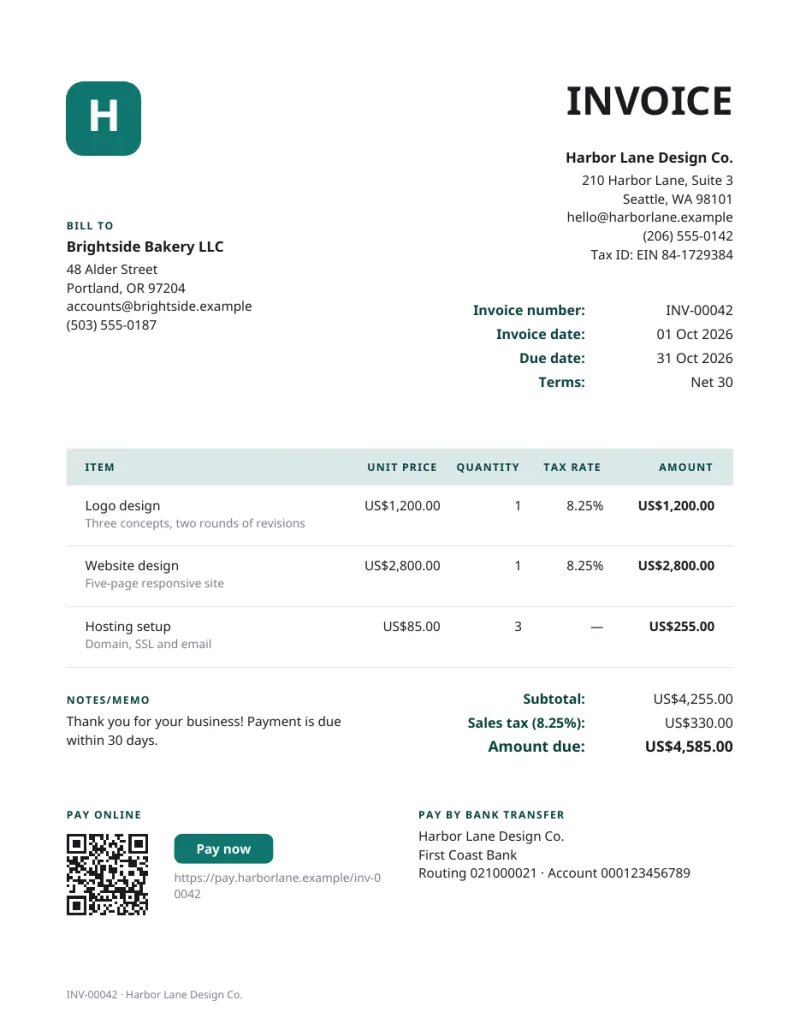
A complete invoice should contain the following:
Your business details: Business name, address, phone number, and email. If you have a tax or VAT registration number, include it here.
Client details: Your customer's name, company, address, email, and phone number.
Invoice number: A unique identifier. Use a consistent system — sequential (INV-00001) or date-based (2026-08-001) — to keep records organized.
Invoice date: The date the invoice is issued.
Due date: When payment is expected. Common terms are "Due on receipt", "Net 15", or "Net 30".
Line items: Each product or service, the quantity, the unit price, and the line total.
Subtotal, tax, and total: The sum of all line items, any applicable tax or discount, and the final amount due.
Payment instructions: How the client should pay: a payment link, bank details (ACH routing and account number in the US, IBAN and SWIFT/BIC internationally), who to make checks payable to and where to mail them, or a payment app such as Zelle, Venmo, or PayPal. You can list more than one. US clients often need a W-9 before paying a new contractor, so add "W-9 available on request" to your notes or send it with your first invoice.
Notes or terms: Late payment fees, early payment discounts, or anything else the client needs to know.
How to send an invoice
Once your invoice is ready, you need to get it to your client.
Email (recommended): Attach the PDF. It is the fastest, cheapest, and most reliable method, your client receives it instantly, and your sent folder is the delivery record. Mention the invoice number, the amount due, and the due date in the message.
Post: Print and mail it. Slower and more expensive, but some clients and industries still prefer paper. Always keep a digital copy.
An invoicing platform: Accounting software can send invoices directly, often with read receipts, automatic reminders, and payment links.
In person: For local or on-site work, hand it over directly — then follow up with a digital copy so both parties have a record.
Sample covering email
Subject: Invoice [INV-00001] from [Your Business] Hi [Client Name], Please find attached the invoice for [description of services] provided on [date]. The total amount due is [amount], payable by [due date]. If you have any questions, feel free to reach out. Best regards, [Your Name]
When to send an invoice
Timing matters. Send your invoice as soon as the work is complete or the product is delivered. The longer you wait to invoice, the longer you wait to be paid.
For project work, invoice on the day you deliver the final output. For ongoing services, set a billing cycle — weekly, biweekly, or monthly — and invoice on the same day each cycle so your client knows when to expect it.
For large projects, consider milestone invoicing: bill a portion at key stages, for example 30% upfront, 40% at the midpoint, and 30% on completion. It keeps cash flow steady and reduces the risk of chasing one large sum. Always agree payment terms before starting work — clear expectations upfront prevent disputes later.
Tips for getting paid on time
Send invoices promptly: The sooner you invoice, the sooner you are paid. A late invoice signals that payment is not urgent.
Be clear on terms: State the due date, accepted payment methods, and any late fees on the invoice itself. Ambiguity invites delay.
Offer several ways to pay: ACH or bank transfer, card through a payment link, Zelle, Venmo, PayPal, or check. List every method you accept — the easier paying is, the faster it happens.
Send reminders: A friendly note a few days before the due date, and a follow-up shortly after if nothing has arrived.
Reward early payment: A small discount — 2% for payment within 10 days — can move you up the queue.
Track what is outstanding: Keep a record of every invoice and its status. A spreadsheet works; invoicing software works better.
Charge late fees: If your terms include them, apply them consistently. It establishes that your terms are real.
Types of invoices
Different situations call for different documents. The most common are:
Standard invoice: A straightforward request for payment after goods or services have been provided.
Proforma invoice: A preliminary invoice sent before work begins, outlining expected costs. A quote, not a demand for payment.
Recurring invoice: For ongoing services billed at regular intervals — retainers, subscriptions, maintenance contracts.
Credit note: Issued to reduce the amount on an invoice already sent, for returns, overpayments, or billing errors.
Debit note: The opposite of a credit note — issued to increase the amount due, usually for extra charges.
Commercial invoice: Used in international trade. Carries customs information such as country of origin, tariff codes, and Incoterms.
Timesheet invoice: For work billed by the hour: hours worked, hourly rate, and a total for each task.
Invoicing questions, answered
Is this invoice generator free?
Yes. Making and downloading invoices here is completely free: no sign-up, no watermark and no usage limits, for personal or commercial use. If you want your invoices, clients and numbering saved, Billsato Pro is an optional paid plan: free for 7 days, then $10 a month.
Do I need to create an account to use Billsato?
No. You can build, customize, and download an invoice without signing up. The invoice is generated in your browser and never sent to a server. You only need an account for Billsato Pro, which saves your invoices and clients so you can reuse them.
Can I make an invoice on my phone?
Yes. Billsato works in the browser on any phone, tablet or computer, with nothing to install. Fill in the form, check the live preview, and download the PDF straight to your device to email or share.
What is the difference between an invoice and a receipt?
An invoice is a request for payment — it is sent before the client pays. A receipt is proof of payment — it is issued after the money has been received. In short, an invoice says "you owe this", and a receipt says "you paid this".
What is the difference between an invoice and a bill?
An invoice and a bill are the same document seen from different angles. The seller sends an invoice; the buyer receives a bill. The content is identical — it is the perspective that changes.
What is the difference between an invoice and a purchase order?
A purchase order is issued by the buyer before a transaction to authorize a purchase. An invoice is issued by the seller after the transaction to request payment. The purchase order comes first ("I want to buy this"), and the invoice follows ("here is what you owe").
Are invoices created with Billsato valid for tax purposes?
Invoices generated with Billsato include the fields generally required for tax documentation — business details, client details, itemized charges, tax amounts, and invoice numbers. Tax requirements vary by country and jurisdiction, so consult a tax professional to confirm your invoices meet local requirements. Billsato does not support e-invoicing mandates: where B2B or government e-invoicing is required — for example in Belgium, Germany, France, Italy, Poland, Taiwan and Uzbekistan, as their rules phase in — a PDF invoice is not a valid tax invoice on its own.
Can I download my invoice as a PDF?
Yes. The PDF is generated in your browser as you fill the form, and Download PDF saves it as a print-ready PDF in US Letter or A4 size — suitable for emailing to clients, attaching to accounting records, or filing for tax purposes.
Is there an invoice template I can download?
You do not need one. Billsato is an online invoice template: fill in the fields and download the finished invoice as a PDF, already laid out and totalled. Choose US Letter or A4, and add your logo and a theme color if you like.
Does an invoice need a logo?
No, a logo is not required for an invoice to be valid. Adding your company logo does give the invoice a more polished appearance, reinforces your brand, and makes your invoices instantly recognizable to clients.
How do I add my logo to an invoice?
Create a free Billsato account and upload your logo under Settings. It is stored with your sender profile and printed at the top of every invoice you generate from then on. PNG and JPG files work best.
What invoice number format should I use?
Use a system that is sequential, unique and easy to search. Common formats are a simple sequence with a prefix (INV-00001, INV-00002), a year prefix (2026-001), or a client code (ACME-001). Billsato starts you at INV-00001 and you can change it. Never reuse or skip a number: every invoice needs a unique invoice number, and gaps invite questions during a tax audit.
How do I calculate tax on an invoice?
Enter your tax rate in the summary panel and Billsato applies it automatically. You can name the tax — "CA sales tax", "VAT", "GST" — so the client sees exactly what is being charged. In the US, sales tax is set by state, county, and city, so the rate depends on where the sale takes place, and many states do not tax services at all. If an invoice mixes taxable and exempt items, turn on "Choose taxable lines" and untick the exempt ones; only the taxable lines count toward the tax. Elsewhere, use your VAT or GST rate — for example 20% VAT in the UK or 10% GST in Australia.
Can I use this invoice generator for international clients?
Yes. Pick the currency from the dropdown and every amount on the invoice is formatted for it. Specify the currency clearly on each invoice so an overseas client is never guessing which dollar or krone you mean.
Can I create an invoice in another language?
Yes. Billsato is available in 67 languages. Switch the language at the top of the page and the form, the invoice labels and the PDF all change with it, so you can invoice a client in their own language, in any of 37 currencies.
What payment terms should I put on an invoice?
Common terms are "Due on receipt", "Net 15", "Net 30", and "Net 60". You can also offer an early payment discount such as "2/10 Net 30" — 2% off if paid within 10 days, full amount due in 30. Choose terms that balance your cash flow against what is normal in your industry, and write them in the notes field.
How long should I keep invoice records?
Most tax authorities expect invoice records to be kept for 5 to 7 years. In the US the IRS generally requires 3 to 7 years depending on the situation; in the UK HMRC requires 6 years; in the EU it varies by country, typically 5 to 10. Check your local tax authority and your accountant for specifics.
What is a proforma invoice?
A proforma invoice is a preliminary invoice sent before work begins or goods are delivered. It is essentially a detailed quote — expected costs, quantities, and terms. Proforma invoices are common in international trade, helping a buyer arrange financing or clear customs. They are not a demand for payment.
What is a recurring invoice?
A recurring invoice is sent at regular intervals — weekly, monthly, or quarterly — for ongoing services or subscriptions. Monthly retainers, subscription charges, and maintenance contracts are typical examples. With Billsato Pro you can duplicate last month’s invoice instead of retyping it.
What is a credit note?
A credit note, also called a credit memo, is issued by the seller to reduce the amount a buyer owes. It is used to correct an error on an invoice already sent, process a return or refund, or apply a discount after the fact. It references the original invoice number and states the adjusted amount.
Can I add a discount to my invoice?
Yes. The summary panel takes either a percentage or a fixed-amount discount, applies it to the subtotal, and shows the discount as its own line on the finished invoice so your client can see exactly how the total was reached.
What should I do if a client doesn't pay an invoice?
Start with a polite reminder a few days after the due date. If nothing comes back, send a formal overdue notice quoting the invoice number, original due date, and outstanding amount. If it stays unpaid after several follow-ups, consider charging a late fee where your terms allow it, pausing ongoing work, offering a payment plan, or — as a last resort — a collections service or legal advice. Keep records of every communication.
Does "invoice" mean I have been paid?
No. An invoice is a request for payment, not confirmation of one. Receiving an invoice means money is owed. Once payment arrives, the seller issues a receipt or marks the invoice as paid.
Can I use Billsato's invoice generator for freelance work?
Absolutely. Billsato is built for freelancers, contractors, consultants, and small businesses. Bill hourly work, project fees, product sales, or any mix of them — fractional quantities such as 2.5 hours are handled properly.
Will my invoice have a watermark?
No. Invoices created with Billsato are clean, watermark-free, and professional. The PDF you download is ready to send as-is, with no Billsato branding on the document.
How is an invoice different from an estimate or a quote?
An estimate or quote is sent before work begins and says roughly what the work will cost; it is generally not binding. An invoice is sent after the work is done, or at an agreed milestone, and is a formal request for payment. The estimate says "this is what it will cost"; the invoice says "this is what you owe".